
Getting RTL (right-to-left) language annotations to render correctly in Linux PDF apps is the absolute end-boss of formatting. It doesn’t matter which app you use—Okular, Master PDF Editor, or whatever else is in the repos—they all seem to have a vendetta against the “wrong side of the road” languages like Hebrew, Arabic, Farsi, Urdu, Pashto, etc.
As soon as I try to paste in an annotation saying, for example, “שלום” (shalom), it looks alright in the modal, although the left alignment is already an early warning sign that this isn’t fully parsed as RTL text:
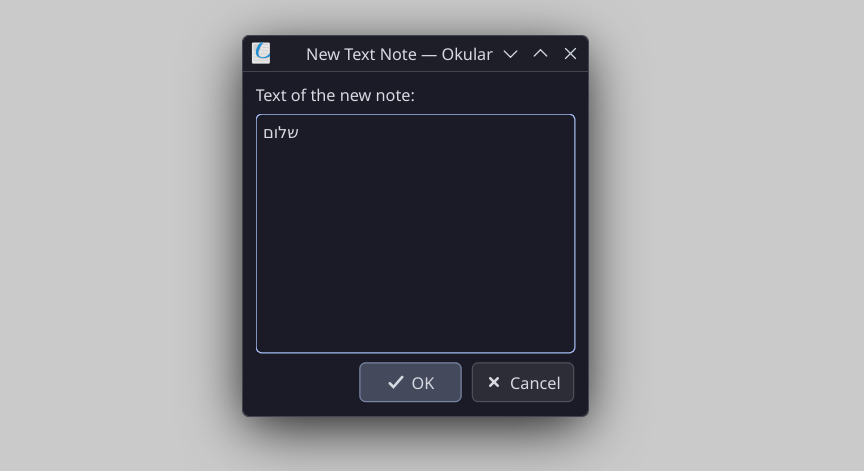
But as soon as I hit “OK”? It flips. It renders as “םולש” (molash).
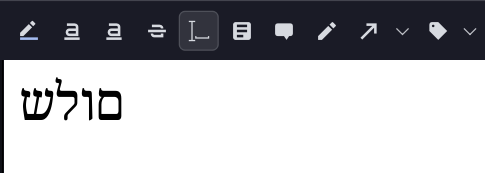
I work with Hebrew PDF documents constantly, and this has been a consistent blight on my otherwise happy Linux life. I even went so far as to try patching Okular (my favorite PDF app, if you couldn’t tell), but my C++ skills weren’t enough to defeat the beast.
And then it hit me. The glorious solution to this annoying problem. It is hacky as hell. In fact, it is such a gloriously dirty fix that one might almost call it elegant.
The RTL Fixer Script
I present to you the RTL Fixer: four lines (three if you’re a minimalist who hates notifications) of glorious letter reversal.
#!/bin/bash

content=$(wl-paste)

reversed=$(echo "$content" | rev)

echo -n "$reversed" | wl-copy

notify-send "Clipboard reversed" "$reversed"
What does it do? Exactly what it says on the tin. It takes whatever is in your clipboard, reverses the character order, and shoves it back into the clipboard.
The Workflow
Once bound to a hotkey (I use Alt+R), the workflow is seamless:
- Type your RTL text.
- Select and copy it. (CTRL+A, CTRL+C)
- Hit Alt+R.
- Paste it. (CTRL+V)
Enjoy your correctly rendered RTL text. (Of course, if you hate this 4-hotkey-pronged workflow, you could easily chain them, but for the sake of this post, let’s keep it simple.)
It works because the PDF viewer is going to reverse the letters anyway, so we’re just preemptively reversing them so they land in the “wrong” order, which makes them look right. It’s double-negative logic for the digital age.
And there you have it. Finally! RTL annotations in Linux PDF apps. Just as the good Lord intended. Well, strike that. The PDF format is clearly the devil’s work.
The “Legacy” Edition (X11)
I see you over there, still clinging to Xorg like a comforting, slightly buggy security blanket. If you aren’t on Wayland yet, the wl-clipboard tools won’t help you. You’ll need xclip installed.
Your version of the “dirty fix” looks like this:
#!/bin/bash

content=$(xclip -selection clipboard -o)

reversed=$(echo "$content" | rev)

echo -n "$reversed" | xclip -selection clipboard

notify-send "Clipboard reversed" "$reversed"
Same logic, different plumbing.
A Small Warning for the Multiline-Enthusiasts
Because we are using the rev command, this script is a “dumb” character-by-character flipper. It works flawlessly for single lines or short phrases. However, if you try to reverse a three-paragraph manifesto, it will reverse the entire string: meaning your last line will become your first line, and your brain will melt trying to read it.
Stick to one line at a time, and you’ll be golden.
Anyway, perhaps this will help someone else out there in the struggle. Or perhaps the PDF reader maintainers will eventually fix the BiDi engine.
Then again, I’m not holding my breath. The Venn diagram of “Linux Desktop Users” and “RTL-enjoyers” is probably not a massive circle.
In the meantime, I will keep calm and hit Alt+R.
Molash… I mean, Shalom.